

Open almost any online store with more than five hundred products and look at the filter sidebar on the left.
Chances are you are looking straight into the buyer’s warehouse database. You see material codes, internal subcategories, dozens of supplier names, and technical dimensions down to the millimeter.
For the ERP system, that list makes complete sense. For the customer trying to buy something on a Saturday morning, that same sidebar is where the purchase dies.
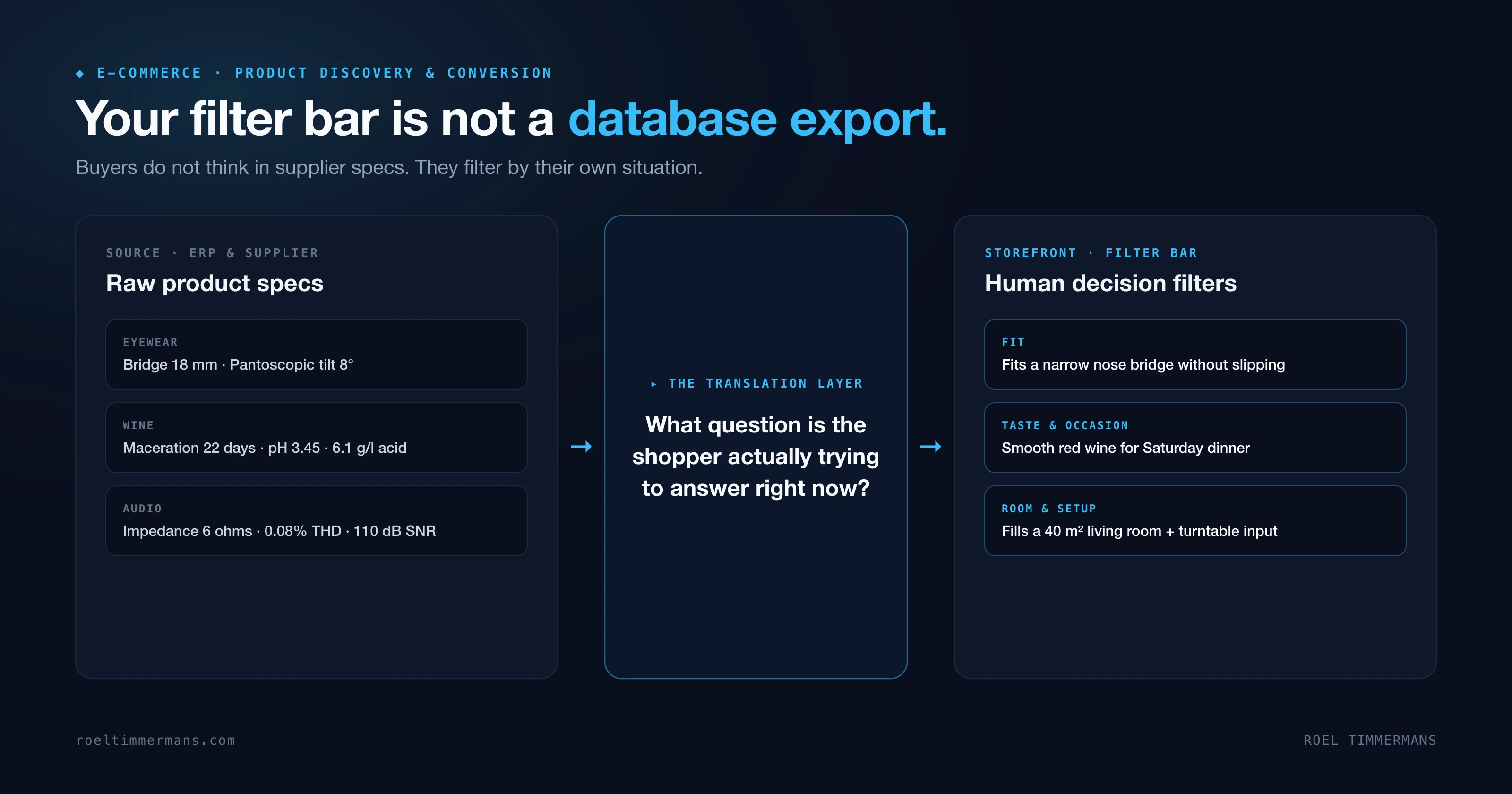
The problem with an untranslated database
When e-commerce teams launch a new category, almost all their energy goes into populating the PIM (Product Information Management) system. Every attribute the manufacturer sends over gets its own field (hello Amazon). A developer then hooks those fields directly into the faceted filters on the category page.
That creates filters nobody asks for in real life:
- In eyewear (which I saw up close for years working with brands across GrandVision and Ray-Ban): shoppers can filter by an 18-millimeter bridge width or a 140-millimeter temple length. Yet the person looking in the mirror only wants to know one thing: will this frame suit a round face without sliding down my nose?
- In home audio (like during my time at Denon and Marantz): filters for impedance in ohms, total harmonic distortion, and DAC architecture. Meanwhile, the buyer wants to know: will this amplifier fill a 40-square-meter living room, and can I plug my turntable straight into it?
- In wine and craft beer (from Beerwulf to our catalog of 5,000+ bottles at PerfecteWijn.nl): dropdowns with eighty French sub-appellations (yes, okay, some people really do want Gevrey-Chambertin specifically and not Fixin) or hop varieties, while the visitor is simply looking for a smooth red wine under twenty euros to serve with roasted lamb.
The moment a visitor has to mentally translate your internal product specs into their own situation, you lose sales.
Why more choice without translation causes paralysis
In 2000, psychologists Sheena Iyengar and Mark Lepper ran a field experiment at an upscale grocery store in California. On one day, shoppers saw a tasting booth with 24 varieties of jam; on another day, the booth held 6 varieties. The larger display attracted more passersby (60% stopped vs. 40% at the smaller table). At the register, the numbers flipped: only 3% of the people who visited the 24-jam table actually bought a jar. At the 6-jam table, 30% made a purchase.
An online store with a thousand SKUs is a tasting table with a thousand jars. The sole job of your filter bar is to cut those thousand options down to a shortlist of five or six relevant contenders within two clicks.
When your filters consist of industry jargon that the customer does not speak, one of two things happens:
- The shopper avoids clicking any filter out of fear of accidentally hiding the right product, scrolls through endless pages of items, and leaves.
- The shopper checks three specific technical boxes at once and lands on a “0 results found” dead end.
Large-scale usability research by the Baymard Institute has shown for years that weak product lists and filtering are among the top causes of category abandonment. Even so, a majority of major e-commerce sites still fail to offer filters based on use case or desired outcome.
Moving from technical specs to buying help
You do not need to rebuild your ERP or PIM from scratch to fix this. Your warehouse and purchasing teams still need those exact technical parameters. What is missing is a translation layer between your raw database and your storefront.
Four practical changes that immediately improve category conversion:
1. Map technical values to human questions
Create a rule-based translation table where multiple raw specifications combine into a single customer-facing filter.
For wine at PerfecteWijn, we map raw data points like grape variety, oak aging, acidity, and regional climate into four visual taste sliders (such as light to full-bodied, or fresh to rich) alongside concrete food pairings. The technical data stays intact under the hood, while the shopper navigates using everyday language.

The same logic works in fashion, electronics, and sporting goods. A pillow filter labeled “Best for side sleepers” is simply a rule under the hood combining fill weight, loft height, and firmness.
2. Use your site search logs as a cheat sheet for missing filters
Want to know which filters your category pages are missing? Open your internal site search logs from the past ninety days.
Shoppers frequently turn to the search bar when your navigation or sidebar filters fail them. What they type into that box shows you how they naturally describe your products: “glasses narrow nose bridge”, “wine for pasta pesto”, “waterproof winter running shoes”.
If hundreds of visitors a month type the same situation into your search bar and that phrase does not exist as a clickable filter on your category page, you are leaving money on the table every single day.
3. Clean up fragmented single-item filter values
Nothing ruins a filter sidebar faster than a color list of forty checkboxes containing Dark Blue, Navy, Marine, Midnight Blue, and Cobalt, each matching only one or two products.
Group supplier synonyms into eight to ten clean parent groups for the filter bar. Keep the manufacturer’s poetic color name like Midnight Blue on the Product Detail Page (PDP) where it adds flavor, and keep it out of your navigation sidebar.
4. Eliminate zero-result dead ends
A filter checkbox that leads to “0 products found” is a broken promise in your interface. Configure your facet engine to dynamically disable or hide unavailable combinations the moment a shopper selects their first filter, and always display the live product count next to each option before they click.
Test this yourself
Pull up your highest-traffic category page on your phone and look at the first five filters visible on screen.
Are those words a customer would actually say out loud to a salesperson in a physical store? Or are they column headers from your supplier’s spreadsheet?